In this post from the series of reviews of productivity tools, I'll write more about a very cool and known tool, but not properly explored which is the Google Calendar.
Google Calendar
Google Calendar is a tool focused for scheduling your (and your team) activities with a agenda-like style, it presents your activities in a chronological and linear way.
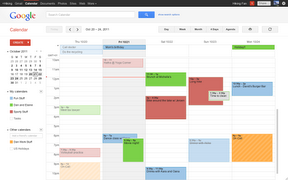 |
| Google Calendar main view |
The desktop view provides a drop-n-drop interface style (I still can't understand why there isn't something like this in the mobile versions) which each calendar shows up with a different color in the screen, with an easy to see your agenda for the next days.
 |
| Task details and setup |
Each task does have some interesting options, like recurrence, place to occur and invite people do attend the event. And there are some interesting integrations with other tools, like Google Now (it provides you some cards with traffic info and ETA to arrive into the place for the next event), Remember the Milk (it allows you to see the tasks from RTM via Calendar) and Google Tasks.
 |
| Google calendar mobile version |
Pros:
- Usability is awesome!
- Very simples and straightforward to use.
- Receive notifications in your desktop, smartphone or tablet.
- When you don't check you smartphone or tablet for a while, it floods you with notifications.
- It can take a while to get used to creating tasks instead of writing in a notepad-like app.
- The integration to other calendars and some advanced functions have poor support.
That's it! Give Google Calendar a try if you need a flexible and online agenda!


No comments:
Post a Comment